
blog
PVYai native Function Call for MCP Tools over SSE API
This post explains why PVYai achieves your objectives more efficiently, rapidly, and cost-effectively than other AI solution providers. The following analysis is intended for a non-technical audience, utilizing descriptive language and minimizing technical terminology to ensure clarity
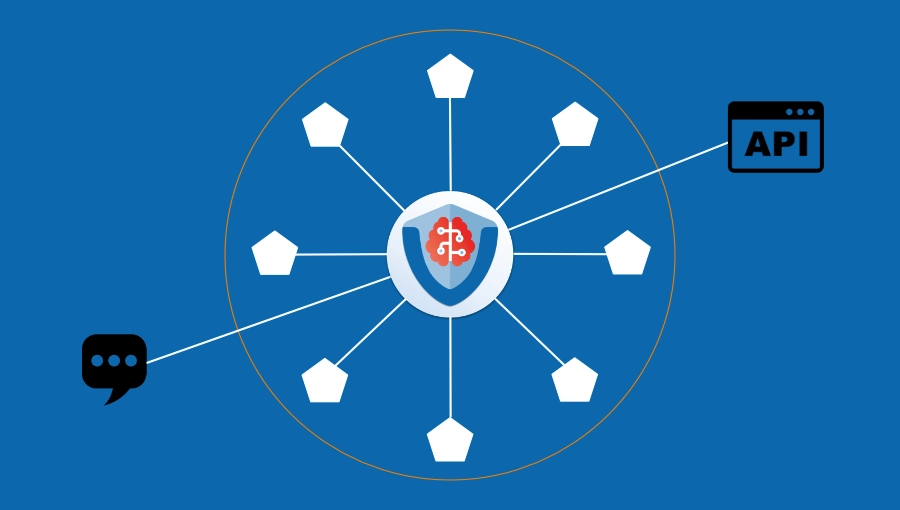
PVYai Services are tailored to each customer, built upon the core principles of PVY.swiss's PriVacY and security framework. These services are designed to be self-contained for each client, functioning similarly to other AI services but accessed through a unified interface.
What Are Large Language Models and Their Native Tools?
Large Language Models (LLMs) — AI systems trained on vast amounts of text to understand and generate human language — must be capable of utilizing tools to comply with user instructions.
LLMs come equipped with several built-in tools, such as "Bash," "Edit File," "Write File," "Grep," and "Search." This capability is referred to as native function calling — meaning the functionality is integrated directly into the model according to an industry standard, analogous to ISO standards.
While this enables an AI model to perform numerous tasks, its capabilities are limited depending on the defined use case. By default, no LLM can read PDF files; it is limited to text and Markdown files. This is one example among many.
The Traditional Chat Interface Approach
The most common method for interacting with an LLM is a chat interface. Through this interface, the user submits inquiries or assigns tasks and provides supplementary information — ideally in Markdown format within a folder structure. This structure enables the LLM to identify:
- The location of the information, tasks, and rules required to execute the desired activity
- The specific expectations of its performance
To enable the chat interface to function, standardized interfaces are utilized to ensure that various LLMs can interact with a user and process data. A simplified process model is provided below:
- User input
- Analysis of user input (Existing knowledge and required research)
- Tool selection — What tools were provided to assist in achieving the objective efficiently and accurately?
- Execution of the user input, potentially including analysis for correctness (which is infrequently performed)
- Response to the user
While the LLM typically possesses only eight standardized tools, additional tools with predefined functions must be specifically provided for other tasks.
The Problem with Traditional MCP Server Integration
There is an industry standard for extending LLM capabilities, summarized by the abbreviation MCP Server (Model Context Protocol Server). Currently, there are several hundred specific MCP servers that generally provide tools and function calls for specific solutions, such as GitLab servers or payment gateways.
However, this traditional approach presents several significant disadvantages:
Token Overhead and Cost
This involves not only the configuration effort required to ensure that the LLM (i.e., the AI) is aware of the additional specific tools at its disposal, but also the implementation of different interfaces to access them.
These MCP servers offer their functions through specific commands for interacting with the provided tools; they are typically accessed via CURL or the MCP server's URL, and potentially a designated port.
The LLM submits a request to this MCP server to inquire about available permissions and tools. The server provides a response listing the tools, but initially omits the corresponding commands for each tool. Consequently, a single call is insufficient for the LLM to become productively active.
In simpler terms, this means that the AI, in addition to its native tools, must request additional tools via a separate route, receiving a list of MCP servers and a tool catalog for each server. This results in a significant loss of contextual knowledge, while the number of tokens required to maintain this context increases rapidly and, depending on the LLM utilized, incurs additional costs.
Latency and Performance Issues
Further complicating the matter is that these tools cannot be utilized in a conventional manner, which reduces efficiency and introduces IT architectural challenges and risks. Specifically, these MCP servers require a subdomain and must be securely and exclusively restricted regarding access and execution for remote employees and "AI" agents located within a cloud application, ensuring they are not publicly accessible.
This may be a GitLab Enterprise MCP server, a CAD MCP server, or a diagram MCP server.
This traditional approach presents several disadvantages regarding maintenance and cybersecurity, as well as limitations for the LLM itself. Specifically, it may preclude the addition of functional layers to the LLM, such as PriVacY and data protection features, agentic functions, or the ability to operate in swarms or loops when invoking functions from widely used software solutions, such as OpenCode Desktop, or when embedded within an application. Furthermore, it necessitates significant manual configuration within desktop software solutions, where MCPs must be manually configured via plugins or integration settings for every employee and for every software application intended to utilize such MCP tools.
Additionally, in such a configuration, the user must explicitly state that if they wish to create a Draw.io diagram and subsequently process it, the AI should utilize the MCP server and its associated tools for that purpose.
The System Prompt Trap
Alternatively, this may be mitigated via a system prompt; however, this approach frequently results in a system prompt of 80,000 tokens, which is transmitted to the LLM and the AI provider with every interaction. This not only exhausts the LLM's context capacity but also increases the costs incurred from the AI/LLM provider. For example, after ten messages, the cost paid to Anthropic may reach $5 due to the expansion of the system prompt for the MCP tool server.
The clever fox might argue: "I do not utilize paid AI cloud APIs; I perform all operations locally." The response to this is: "That further reduces speed by adding unnecessary latency to existing local processing times, while simultaneously reducing the context window, which negatively impacts performance and quality."
Our Solution: Native Function Calls via SSE API
At PVY.swiss, we believe this process can be improved. We make all MCP servers and their tool catalogs available to the LLM as native function calls. This is implemented as a hybrid function, ensuring accessibility via the API as well as through standard chat endpoints, including the desktop and web applications.
SSE API (Server-Sent Events API) is a technology that allows a server to push real-time updates to clients over a single HTTP connection — enabling efficient, low-latency communication without the overhead of polling.
The system prompt for the PVYai models — comprising roles, harness, and rules — is limited to 6,000–8,000 tokens. All other operations are managed via a hybrid discovery mode for advanced native function calls. These processes must operate within the response stream and, ideally, be supported by the cache function. While this appears straightforward, it is complex due to the requirements for backward compatibility and the necessity of supporting both a Large Language Model (LLM) and a user permission model.
Furthermore, an LLM may utilize available tools via the MCP server in parallel rather than serially, delegate tasks to sub-agents, and allocate its context window to higher-order functions beyond merely forwarding user requests to MCP server tools, verifying results, and triggering subsequent actions.
This approach offers multiple benefits: it increases efficiency while simultaneously reducing costs, provides an API that delivers all functions — including security and control mechanisms — in real-time, and conserves the LLM's context window for performing analysis and tasks.
Real-World Scenario: From Request to Deployment
The methodology employed remains proprietary. However, it is highly valued by both our users and internal developers. A renowned professor of mathematics, physics, and computer science from a major university, who has utilized PVYai, noted: "Fantastic, you have solved an industrial problem in a very professional, scalable and sustainable way."
Consider the following scenario:
The user is logged into the PVYbusiness OS. Upon opening the PVYai assistant in the right sidebar, the user specifies that additional fields are required in the current view (e.g., the Stripe payment gateway configuration) for advanced Stripe API usage and requests their implementation. Within five seconds, the assistant performs a comprehensive analysis of the existing backend payment processing infrastructure, including BPM flows and notifications. Shortly thereafter, the assistant generates a detailed report, to which the user responds:
"Please create an entry for 'PVYbusiness OS – Stripe – Current State' as 'Session-Handover' in the PVYai Memory for the shared memory 'PVYdevelop.'"
Open OpenCode Desktop on your computer. Within an existing or new session, enter the storage Wing ID and instruct the PVYai Architect to examine the "Session Handover of fields in the backend, the API, and the existing BPM flows in the frontend SRR customer portal" to determine which elements are missing based on Stripe's requirements and must be implemented. The PVYai Architect already possesses the correct fields in its memory and context, eliminating the need for additional information.
Alternatively, an API query could have been initiated from the OpenCode Desktop to achieve the same result; however, this would have consumed significantly more tokens and diminished the remaining context resources, as such interactions also deplete the context.
Ten minutes later, the PVYai Architect or the Senior Lead Developer monitors the pipeline on the GitLab server. Upon confirming that a new Docker image has arrived in the registry, they log in to the server via SSH using their assigned RSA identity and autonomously initiate a new deployment of the new features. In doing so, they strictly adhere to the implemented CIS and CISA rules, ensuring that they do not start a Docker container using "sudo docker compose pull & docker compose up -d."
For this purpose, it not only monitors the health status of the containers but also reviews the logs contained therein and displays the following message:
Release XY
Version XZ.YY.YY has been deployed, is functioning correctly, and the logs are clear. This release includes the following new features:
- Card and payment management for customers in accordance with Stripe APIv2 standards.
- Field A (hidden)
- Subscription Stripe ID (hidden)
- Product_os_item_stripe_id (hidden) among 25 other required fields
- Card validation via 3D Secure verification (provider's pop-up window)
- Submit recurring items, available cycles, and discounts with durations to Stripe, selecting discounts based on specified conditions
The system provides the ability to independently modify recurring payment cycles in coordination with the Stripe API. The backend has been switched from live mode to test mode; the process may now be verified using the test customer and test credit card 4444 0000 0000 444. I will monitor the data stream and logs on the Stripe side via MCP and API. I am prepared to proceed; please advise when to begin.
A standardized API — comprising native Function Calling, PVYai Memory with Cross-Domain Shared Memory, and PVYai Sentinel as the orchestrator and security officer — makes this faster, more accurate, and more readily available than if it had been handled manually by programmers.
These improvements result in lower costs, reduced token usage, and improved latency. These benefits extend beyond OpenCode Desktop and VS Code/VS Codium to include the PVYai Agent. Furthermore, the agent is capable of handling swarms and loops, which will be addressed in a subsequent communication.
Architecture Comparison
Classical MCP Server Integration
PVYai Approach: Native Function Calls via SSE API
Key Differences at a Glance
| Aspect | Classical MCP Server | PVYai Native Approach |
|---|---|---|
| Integration | Per-server MCP configuration | Unified SSE API |
| Token Overhead | 80,000+ tokens in system prompt | 1,150–1,300 tokens |
| Latency | Multi-step discovery + execution | Direct function calls |
| Cost | High (context window exhaustion) | Low (optimized context usage) |
| Security | Subdomain-per-server exposure | Centralized Sentinel control |
| Configuration | Manual per-tool, per-user | Zero-config, role-based |
| Parallel Execution | No (serial only) | Yes (parallel + sub-agents) |
A true innovation
The advantages of our innovation are clearly evident. Every LLM model and every PVYai user, regardless of the endpoint used, can immediately and without delay access the additional tools made available via the Unified SEE API (OpenAI API Compatible – Extended) in a “natural” way, provided that the permission matrix allows it. Not only that, but while the classic MCP server orchestration only allows for serial execution of its tools, the architecture of PVYai allows for parallel execution; the LLM can assign a sub-agent (specialist) to execute it and can take care of other tasks in the meantime.
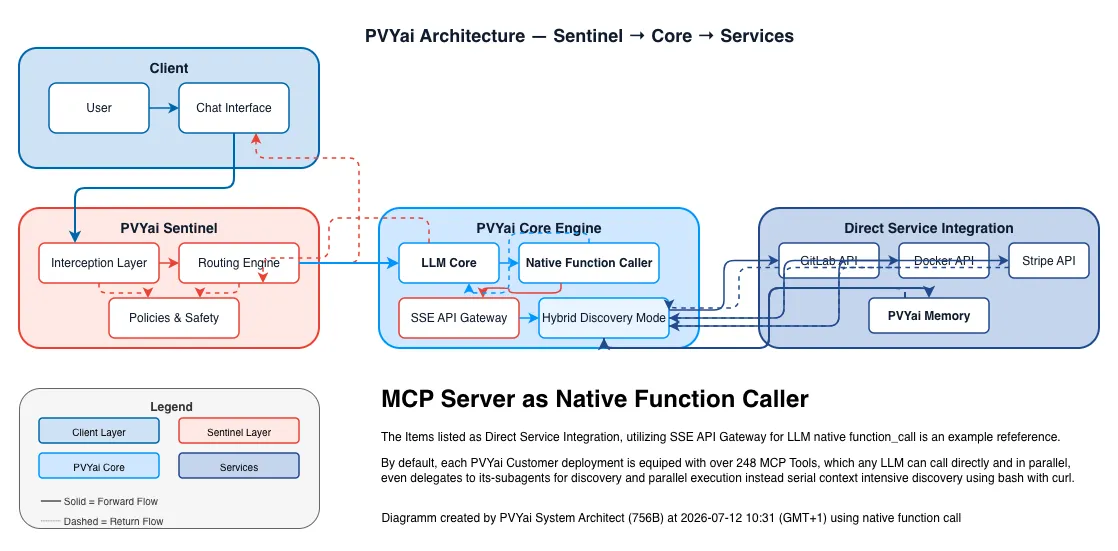
The system administrator of PVYai (which is provided hermetically sealed for each customer) can define in the PVYai model administration in the backend, for each LLM, which MCP servers (tools) it has access to. Similarly, they can control this for users and groups at the user level. The permission matrix is therefore implemented in a way that is far more advanced than the usual enterprise standard.
Of course, the PVYai Sentinel also monitors user and LLM interactions and protects against destructive interactions when accessing tools, before they can be executed. And we server MCP Servers, which serve already the newer https-stream protocoll, exact the same way. Again with a massive speed gain for execution.